
Long SDI cable runs can introduce signal loss, dropouts, and difficult installation constraints. The right converter helps match your camera, monitor, recorder, and cabling while preserving a dependable video signal.
This roundup covers fiber-based extenders, SDI distribution hardware, HDMI-to-SDI and SDI-to-HDMI converters, and compact bidirectional options for production, broadcast, event, and surveillance setups.
Best 10 Sdi Converters for Long Cable Runs Picks for 2026
Best Fiber Kit

- Complete TX/RX kit with LC SFP modules
- Up to 20 km on single-mode fiber
- Compact USB-C power and flexible mounting
Best For: Very long SDI links in studio, field, and industrial setups
Best HDMI Conversion Value
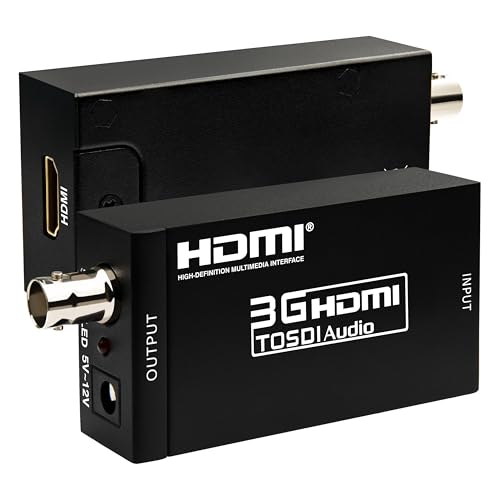
- Converts HDMI sources to 3G-SDI
- Supports up to 100 m at 3G-SDI
- De-embeds up to eight audio channels
Best For: Events and productions extending HDMI sources over SDI coax
Best SDI Distribution Amp
Blackmagic Mini Converter SDI Distribution

- Splits one SDI input to eight outputs
- Outputs are re-clocked for distribution
- Supports SD, HD, 3G-SDI, audio, and data
Best For: Studios and live systems feeding multiple SDI destinations
Best Long Coax Cable
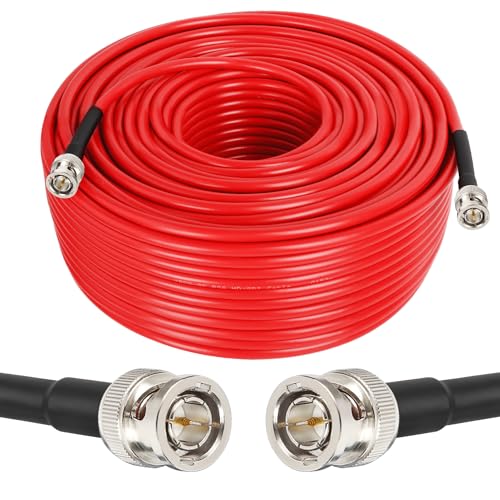
- 250-foot 75-ohm RG59 SDI cable
- Male BNC connectors for direct connections
- Dual shielding and support up to 6 Gb/s
Best For: Indoor camera, monitor, recorder, and converter links
Distribution Hub
Teranex Mini SDI Distribution 12G

- One 12G-SDI input and eight outputs
- Supports SD through 4K formats
- USB or Ethernet configuration
Best For: Multi-device SDI distribution
Bidirectional Bridge

- Converts HDMI and SDI in both directions
- Supports 3G Level A and B
- Automatic active-input selection
Best For: Mixed HDMI and SDI workflows
Compact Camera Link
Micro Converter BiDirect SDI/HDMI 3G

- Bidirectional SDI and HDMI conversion
- Supports multiple signal speeds
- AC power included
Best For: Camera and monitor connections
Best Long-Run SDI-to-HDMI Pick
Anber-Tech SDI to HDMI Converter
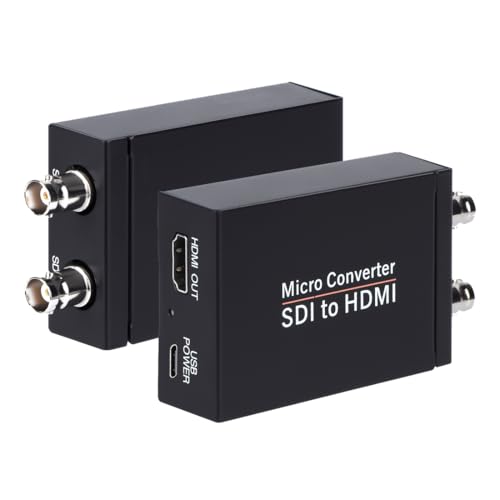
- Supports 3G-, HD-, and SD-SDI formats
- Input distances listed up to 1,000 feet for SD-SDI
- Includes HDMI output, SDI loopout, and audio de-embedding
Best For: Long SDI camera-to-display runs
Best 12G Workflow Converter
Blackmagic Micro Converter HDMI to SDI 12G

- Offers two SDI outputs from an HDMI input
- Supports SDI rates up to 12G
- Includes automatic HDMI matching and SDI reclocking
Best For: HDMI-to-SDI distribution and high-rate workflows
Best Simple Full-HD Adapter
SHUITING SDI to HDMI Converter

- Accepts HD-SDI, 3G-SDI, and SD-SDI inputs
- Adds SDI loopout with HDMI display output
- Supports up to 1080p, not 4K
Best For: Basic full-HD SDI camera monitoring
Best Fiber Kit – 3G/HD-SDI Over Fiber Extender
For sdi converters for long cable runs, this complete fiber kit is the most purpose-built option here. It includes matched transmitter and receiver units with LC SFP modules, supporting uncompressed SD-, HD-, and 3G-SDI signals across up to 20 km of single-mode fiber or 1 km of multimode fiber.
Best For: Studio, field, or industrial installations requiring very long SDI runs over fiber.
Pros:
- Includes both TX and RX units, SFP modules, power supplies, cables, and mounting hardware.
- Reaches up to 20 km on single-mode fiber.
- Compact USB-C-powered design suits camera rigs and tight enclosures.
- Status LEDs show power, fiber link, and video status.
Cons:
- Requires compatible fiber cabling and uses an optical connection rather than direct coax.
- Multimode reach is limited to 1 km.
This is the strongest choice when distance, portability, and installation flexibility matter more than using existing BNC coax. Its included accessories also reduce setup work.
Best HDMI Conversion Value – HDMI to 3G-SDI Converter
This HDMI-to-SDI unit is a practical pick for sdi converters for long cable runs when the source is HDMI. It converts common HD and Full HD formats to 3G-SDI and supports coaxial transmission distances up to 100 m for 3G-SDI, 200 m for HD-SDI, or 300 m for SD-SDI.
Best For: Live production, events, and installations that need to place an HDMI source far from an SDI monitor or other SDI equipment.
Pros:
- Supports up to 1080p at 60 Hz and multiple SD, HD, and 3G formats.
- Offers stated coaxial reach of up to 100 m for 3G-SDI.
- De-embeds up to eight channels of 48 kHz audio.
- Compact all-metal housing needs no drivers or software.
Cons:
- It converts HDMI to SDI only, so it is not a general-purpose bidirectional converter.
- Long-distance performance depends on the SDI coaxial cable and signal format.
Choose this model when HDMI compatibility and embedded-audio handling are central requirements. It is especially useful where existing SDI infrastructure can carry the converted signal.
Best SDI Distribution Amp – Blackmagic Mini Converter SDI Distribution
Although it is not a cable-length extender, this Blackmagic unit can complement sdi converters for long cable runs by distributing one incoming SDI signal to multiple destinations. It accepts SD-, HD-, and 3G-SDI and provides eight re-clocked outputs, helping feed several downstream devices from a single source.
Best For: Broadcast, live-event, and studio systems that need multiple stabilized SDI feeds.
Pros:
- Provides eight re-clocked SDI outputs from one input.
- Automatically switches among supported SD, HD, and 3G formats.
- Handles embedded audio and ancillary data.
- Includes a redundant SDI input for mission-critical applications.
Cons:
- It is a distribution amplifier, not a fiber or HDMI converter.
- The supplied notes specify a 12 V minimum supply rather than USB-C power.
This is best viewed as a signal-splitting component for the end of a distribution chain. Pair it with an appropriate extender when a long run must feed several SDI devices.
Best Long Coax Cable – 250-Foot 3G/6G-SDI Cable
For sdi converters for long cable runs, a suitable 75-ohm cable is essential, and this 250-foot RG59 assembly provides a direct coaxial path between SDI-equipped devices. It uses male BNC connectors, dual shielding, and is specified for SDI signals up to 6 Gb/s.
Best For: Camera-to-monitor, recorder, splitter, or converter connections where a 250-foot indoor coax run is practical.
Pros:
- Provides a ready-made 250-foot SDI connection.
- Uses 75-ohm RG59 coax and male BNC connectors.
- Dual shielding is intended to reduce signal attenuation and interference.
- Supports 3G-SDI and is specified with a 6 Gb/s data rate.
Cons:
- It is a cable, not an active converter or fiber extender.
- The supplied usage information lists indoor operation.
- Both connected devices need compatible male/female BNC arrangements.
This option makes sense when the installation can use a single long coax run and does not require optical conversion. Confirm the required SDI format and connector layout before purchasing.
Distribution Hub – Teranex Mini SDI Distribution 12G
For sdi converters for long cable runs, the Teranex Mini SDI Distribution 12G is a practical choice when one SDI source needs to feed multiple downstream devices. It accepts SD, HD, 2K, and 4K 12G-SDI signals and automatically matches the output format.
Best For: Broadcast, live production, and video systems requiring eight SDI outputs from one source.
Pros:
- Supports SD, HD, 2K, and 4K 12G-SDI formats.
- Provides eight 12G-SDI outputs from a single SDI input.
- Automatically switches between supported signal rates.
- Configuration and updates are available through USB or Ethernet.
Cons:
- It distributes SDI rather than converting between HDMI and SDI.
- Its eight-output design may be more than needed for a simple point-to-point setup.
This is the strongest fit for installations that need centralized SDI distribution across multiple destinations. Its multirate support also makes it flexible for mixed-format workflows.
Bidirectional Bridge – Decimator MD-LX HDMI/SDI
The Decimator MD-LX is a compact option for sdi converters for long cable runs when a workflow needs flexible HDMI-to-SDI or SDI-to-HDMI conversion. Its automatic input selection can route an active input to the available outputs.
Best For: Live events, broadcast studios, post-production, and systems connecting devices with HDMI and SDI interfaces.
Pros:
- Supports bidirectional HDMI-to-SDI and SDI-to-HDMI conversion.
- Works with 3G Level A and Level B signals.
- Automatically selects an active input and routes it to outputs.
- Supports several input and output routing combinations.
Cons:
- The supplied notes do not specify support for 6G, 12G, or 4K formats.
- The product notes list no warranty.
Choose this model when compatibility between HDMI and SDI devices matters more than high-bandwidth 12G-SDI distribution. It is particularly suited to flexible production and event setups.
Compact Camera Link – Micro Converter BiDirect SDI/HDMI 3G
For sdi converters for long cable runs in a compact camera or monitoring setup, the Blackmagic Micro Converter BiDirect SDI/HDMI 3G provides bidirectional SDI and HDMI conversion. It supports multiple speeds and includes AC power.
Best For: Camera-to-monitor connections and small video systems needing a portable SDI/HDMI converter.
Pros:
- Provides bidirectional SDI and HDMI conversion.
- Supports multiple signal speeds.
- Includes AC power.
- Designed for camera and monitor applications.
Cons:
- The supplied notes identify it as a 3G converter, not a 12G model.
- The notes list one port, so it may be less suitable for larger distribution setups.
- The listed power details indicate no plug is specified despite AC power being included.
This converter is a sensible portable option for basic SDI/HDMI interoperability near a camera or monitor. For larger installations or higher-rate 12G workflows, a distribution-focused model may be a better match.
Best Long-Run SDI-to-HDMI Pick – Anber-Tech SDI to HDMI Converter
For shoppers comparing sdi converters for long cable runs, this Anber-Tech model stands out with support for 3G-SDI, HD-SDI, and SD-SDI signals, plus automatic format detection. It also provides HDMI output, SDI loopout, and stereo audio de-embedding for compatible monitoring setups.
Best For: SDI camera-to-monitor or projector installations that need long cable support and an SDI loopout.
Pros:
- Supports 3G-SDI, HD-SDI, and SD-SDI with automatic format detection.
- Handles stated input runs up to 300 feet for 3G-SDI, 500 feet for HD-SDI, and 1,000 feet for SD-SDI.
- Offers one HDMI output, one SDI loopout, and support for eight channels of 48 kHz digital audio.
Cons:
- Converts SDI to HDMI only; it is not bidirectional.
- Does not support 4K output according to the listed SDI formats.
This is a practical choice when cable distance and flexible SDI format support matter more than two-way conversion. Verify your camera’s output format and required cable distance before buying.
Best 12G Workflow Converter – Blackmagic Micro Converter HDMI to SDI 12G
The Blackmagic Design Micro Converter HDMI to SDI 12G is a compact option for extending an HDMI source into an SDI-based setup. For sdi converters for long cable runs, its two SDI outputs and support for rates from 270Mb through 12G make it useful when your workflow requires SDI distribution, although the supplied specifications do not state a maximum cable distance.
Best For: Users converting HDMI 2.0 sources to dual SDI outputs in SD, HD, 2K, Ultra HD, or 4K workflows.
Pros:
- Provides two SDI video outputs from one HDMI input.
- Supports 270Mb, 1.5G, 3G, 6G, and 12G SDI rates.
- Automatically matches the HDMI input and includes SDI reclocking.
Cons:
- Converts HDMI to SDI only, rather than SDI to HDMI.
- The supplied details do not specify a maximum cable-run length.
- Requires a 5V to 5.25V direct-current supply.
This model is better suited to high-rate HDMI-to-SDI conversion than to a simple SDI camera monitoring setup. Because no distance rating is provided, confirm the planned cable length and signal requirements before relying on it for a long run.
Best Simple Full-HD Adapter – SHUITING SDI to HDMI Converter
This SHUITING adapter is a straightforward choice for converting an SDI camera feed to HDMI for a television, monitor, or projector. While it does not provide a stated cable-distance rating, its support for HD-SDI, 3G-SDI, and SD-SDI makes it worth considering among sdi converters for long cable runs when your installation remains within the cable’s capabilities.
Best For: Plug-and-play 1080p SDI camera monitoring on an HDMI display or projector.
Pros:
- Supports HD-SDI, 3G-SDI, and SD-SDI input signals.
- Provides SDI loopout alongside HDMI output.
- Uses a durable metal shell and is described as easy to install and operate.
Cons:
- Limited to resolutions up to 1920×1080 and does not support 4K.
- Converts SDI to HDMI only; HDMI-to-SDI conversion is not supported.
- No maximum long-run cable distance is specified in the supplied details.
This converter keeps the setup simple for full-HD monitoring and offers useful loopout flexibility. For a genuinely long cable run, compare the cable distance against a converter with an explicit range rating, such as the Anber-Tech model.
How We Picked the Best Sdi Converters for Long Cable Runs
We focused on signal-management features that matter in real installations: supported SDI data rates, maximum transmission distance, connector type, audio handling, loop-through capability, conversion direction, power requirements, and compatibility with common video formats. The selection includes solutions for short-to-medium copper runs as well as fiber systems designed for much longer distances.
Because “long distance” varies by cable quality and signal standard, published range should be treated as a planning figure rather than a guarantee. Proper 75-ohm cabling, clean connectors, and matching resolution and frame-rate settings are equally important.
Quick Comparison
| Type | Best for | Key advantage |
|---|---|---|
| SDI over fiber | Very long point-to-point runs | Long range with strong resistance to electrical interference |
| SDI distribution converter | Sending one source to multiple destinations | Regenerated outputs and easier system expansion |
| HDMI-to-SDI | Integrating consumer or computer HDMI sources | Converts HDMI devices into SDI workflows |
| SDI-to-HDMI | Using HDMI displays or recorders | Connects professional SDI sources to common screens |
| Bidirectional converter | Flexible field kits | One compact unit supports either signal direction |
Key Buying Factors for Sdi Converters for Long Cable Runs
Signal Standard and Bandwidth
Check whether you need SD-SDI, HD-SDI, 3G-SDI, 6G-SDI, or 12G-SDI. A converter must support the source’s resolution and frame rate, and every component in the chain should be rated for that bandwidth. For 4K workflows, a 12G-SDI model may be preferable, while 1080p systems often fit 3G-SDI hardware.
Copper Versus Fiber Distance
High-quality coax is practical for many conventional runs, but attenuation increases with distance and higher-bandwidth signals. Fiber converters are usually the better choice for very long routes, electrically noisy environments, or links between buildings. Verify whether the kit uses single-mode or multimode fiber and which optical connectors it requires.
Audio and Monitoring Features
If embedded audio matters, look for de-embedding, stereo output, or audio pass-through support. An SDI loop output is useful when the incoming signal must continue to another device, while distribution models are better when several destinations need the same feed.
Power, Installation, and Reliability
Confirm the included power supply, voltage requirements, mounting options, and connector layout. For live production or permanent installations, prioritize robust housings, status indicators, signal reclocking, and readily available replacement power supplies.
Who Should Buy Which Sdi Converters for Long Cable Runs?
- Choose an SDI-over-fiber kit for the longest point-to-point runs or links exposed to interference.
- Choose a distribution converter when one SDI source must feed multiple monitors, recorders, or processing devices.
- Choose HDMI-to-SDI to bring a laptop, camera, or HDMI production device into an SDI infrastructure.
- Choose SDI-to-HDMI when a professional camera or router must connect to an HDMI monitor or television.
- Choose a bidirectional compact converter for travel, mobile production, or mixed-format troubleshooting.
Before ordering, map the complete signal path—including source format, cable type, distance, destination, audio needs, and power access. This prevents choosing a converter that works in isolation but fails to support the entire installation.