
If you want to speak naturally on camera without constantly glancing down at notes, a teleprompter can make livestreams feel more polished and confident.
This roundup of teleprompters for livestreaming focuses on setups that are easy to use, compatible with common devices, and practical for solo creators, educators, and small teams.
Best 10 Teleprompters for Livestreaming Picks for 2026
Built-In Screen Streaming Pick
Elgato Prompter, Built-In Screen 1080p

- Built-in display removes the need for a tablet or phone.
- Reads scripts, Twitch chat, or call notes while facing the camera.
- Supports many cameras and works with PC or Mac.
Best For: Streamers who want an all-in-one teleprompter with desktop control
Budget Tablet Streamer Choice

- No-assembly design keeps setup simple.
- Remote and app control adjust speed, pages, and font size.
- Collapsible frame and carry case help with transport.
Best For: Budget-conscious users who want a simple tablet-based teleprompter
Portable Pro Rig Pick

- Works with smartphones and tablets up to 10.5 x 8 inches.
- 70/30 glass and hood help maintain visibility and clarity.
- Tripod threads and accessory mounts suit production setups.
Best For: Creators building a portable DSLR or tablet teleprompter rig
All-In-One Mirroring Pick
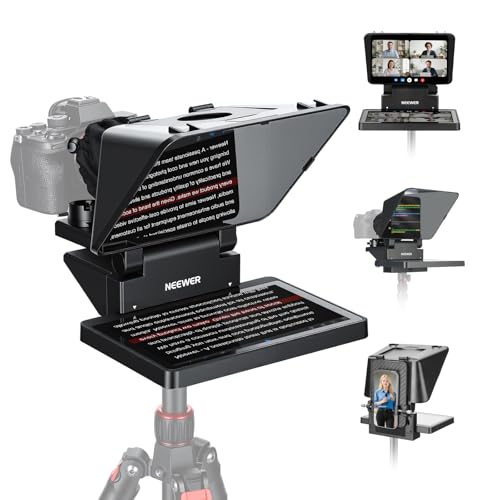
- Built-in LCD monitor supports prompts without a tablet.
- Works as a secondary monitor for Windows and macOS.
- Adjustable holder and quick-release plate aid setup.
Best For: Users who want a built-in display and mirroring flexibility
Studio-Grade DSLR Pick

- Supports tablets up to 12.9" plus DSLR/camcorder setups
- App and Bluetooth remote give hands-free script control
- Solid aluminum build with colorless beam splitter
Best For: Livestreamers and studio creators using a camera and tablet
Portable Mobile Pick
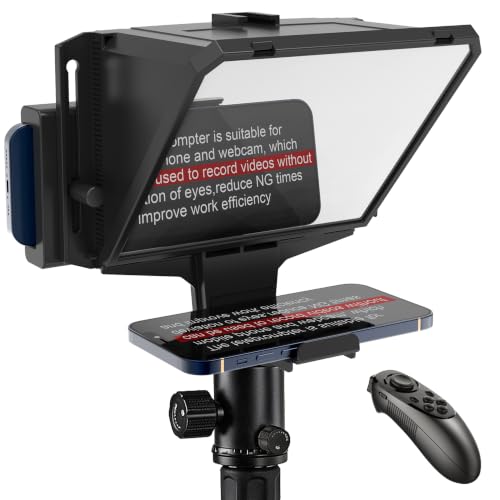
- Works in handheld, desktop, and monitor modes
- 70/30 beamsplitter keeps text clear for webcam use
- Compact build with wireless remote control
Best For: Mobile creators and webcam livestreamers
Versatile All-in-One Pick

- Supports phones, tablets under 11", and DSLR cameras
- Includes app control, Bluetooth remote, and adapter rings
- Coated glass and light seals help reduce glare
Best For: Creators who need one setup for multiple recording devices
Compact Fold Teleprompter
LENSGO TC7S Portable Teleprompter

- One-second fold design for quick setup
- HD beam splitter glass for clear prompting
- Bluetooth remote and app control included
Best For: Portable phone prompting for livestreams, vlogs, and online teaching
All-in-One Collapsible Kit
GVM 12" Collapsible Teleprompter Kit
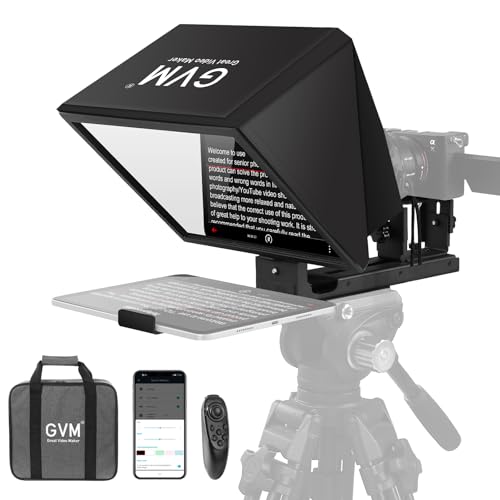
- Installation-free setup with collapsible design
- 12-inch optical glass for clearer reading distance
- Works with phones, tablets, and DSLR/mirrorless cameras
Best For: Multi-device creators who want a larger all-in-one prompting kit
Quick Setup Streamer
9.3" Phone & Camera Teleprompter

- 70/30 beam-splitter glass for readable prompting
- Ready in about 2 minutes with quick-release design
- Bluetooth remote plus iOS/Android app control
Best For: Compact livestream and recording setups that need fast, simple prompting
Built-In Screen Streaming Pick – Elgato Prompter, Built-In Screen 1080p
If you want teleprompters for livestreaming that feel more like a monitor than an accessory, the Elgato Prompter stands out with its built-in display. You can drag and drop any window or app onto the screen, which makes it handy for scripts, Twitch chat, and video calls without needing a separate tablet.
Best For: Streamers and remote presenters who want an all-in-one teleprompter with desktop-based control.
Pros:
- Built-in 9-inch display means no extra tablet or phone is required.
- Supports reading Twitch chat or scripts while maintaining camera eye contact.
- Works with PC or Mac and is designed for easy setup.
- Compatible with many cameras, including wide-lens setups.
Cons:
- Mac use requires free DisplayLink software.
- Android use requires free DisplayLink Presenter software.
- It relies on desktop software rather than a simple mobile-app-only workflow.
For creators who want a streamlined, professional teleprompting setup, this is the most integrated option in the group. The tradeoff is software dependence, but the built-in screen and wide compatibility make it a strong fit for polished livestreaming.
Budget Tablet Streamer Choice – NEEWER X12B 12" No Assembly
For teleprompters for livestreaming that keep costs and setup simple, the NEEWER X12B focuses on the essentials. It uses a no-assembly aluminum-alloy design, works with a tablet for script display, and includes remote plus app control for adjusting scroll speed and font size.
Best For: Budget-minded streamers, educators, and tutorial creators who want a straightforward tablet teleprompter.
Pros:
- No-assembly design makes setup quick and user-friendly.
- Included remote and app allow play/pause, speed, page, and font adjustments.
- 12-inch HD beam splitter glass is readable up to 10 ft away.
- Collapsible body and carry case improve portability.
Cons:
- Not for phone shooting.
- Does not function as a monitor or provide direct self-viewing.
- App support is limited to iOS 11/Android 6 and later.
This is a practical pick if you already plan to use a tablet and want a no-fuss teleprompter for streaming or recorded presentations. It skips extra features, but that keeps the workflow simple and affordable.
Portable Pro Rig Pick – Glide Gear TMP 100 12" Glass
Glide Gear TMP 100 Teleprompter – DSLR, Tablet, Smartphone – 12" Glass, Carry Case, No Assembly
Check Price On AmazonIf you need teleprompters for livestreaming that can travel with a more traditional camera rig, the Glide Gear TMP 100 is built for versatility. It supports smartphones and tablets, uses 70/30 beam splitter glass, and includes a carry bag for easier storage and transport.
Best For: Creators who want a portable teleprompter for DSLR, tablet, or smartphone setups.
Pros:
- Compatible with smartphones and tablets up to 10.5 x 8 inches.
- 70/30 beam splitter glass helps balance script visibility and camera clarity.
- Protective hood and carry bag improve glare control and portability.
- Tripod threads and accessory mounting options add setup flexibility.
Cons:
- Does not fit the iPad Pro.
- App is not included and must support mirror text.
- Weighs 5 pounds, so it is less compact than smaller options.
This model makes sense if you want a sturdy, flexible prompter that can slot into a broader production setup. It is less minimalist than tablet-only options, but the mounting support and durable build are real advantages.
All-In-One Mirroring Pick – NEEWER X11 2-in-1 11" Monitor
Among teleprompters for livestreaming, the NEEWER X11 is designed for users who want a built-in monitor instead of relying on a tablet. It includes a 9-inch LCD screen for live streaming and video conferencing, plus screen mirroring support for phones and tablets when you want a faster script setup.
Best For: Streamers and presenters who want a built-in display for mirroring scripts or using it as a secondary monitor.
Pros:
- Built-in LCD monitor eliminates the need for a separate tablet or phone for prompts.
- Supports screen mirroring from compatible iPhone and Android devices.
- Can work as an external computer monitor for Windows and macOS.
- Adjustable holder and quick-release plate help with camera positioning.
Cons:
- First HDMI computer setup requires a driver.
- Voice sync is not supported.
- Android/iPhone mirroring is limited to DP protocol devices.
This is a strong middle ground for creators who want an integrated display without going all the way to a more specialized prompter system. The extra monitor function adds flexibility, though setup is a little more technical than a basic tablet model.
Studio-Grade DSLR Pick – GVM 18" iPad Teleprompter Kit
If you’re comparing teleprompters for livestreaming and want a sturdier setup for camera-based production, the GVM TQ-L is built for small to mid-sized cameras and tablets up to 12.9 inches. Its solid aluminum construction, wide compatibility, and colorless beam splitter make it a practical choice for creators who need readable scripts without sacrificing image clarity.
Best For: Livestreamers, vloggers, online instructors, and studio users who want a durable teleprompter for DSLR or camcorder workflows.
Pros:
- Supports iPad/tablets up to 12.9″ and works with SLR, camcorder, digital camera, and DV machine setups.
- Includes iOS/Android prompting app with adjustable font size, playback speed, and background color.
- Bluetooth remote adds hands-free scroll speed and start/stop control.
- Colorless beam splitter and wide-angle design are made for clear reading with no ghosting.
Cons:
- At 16.12 pounds, it is heavier than mini teleprompter options.
- Best suited to small- and mid-sized camera rigs rather than ultra-compact mobile setups.
Overall, this GVM kit leans toward creators who value a more traditional studio teleprompter build and broad camera support. If your livestreaming setup centers on a DSLR or similar camera, it offers a solid balance of readability, control, and durability.
Portable Mobile Pick – 7.7" Mini Phone Teleprompter
For creators who need compact teleprompters for livestreaming, this 7.7-inch mini model focuses on portability and flexible mounting. It supports handheld, desktop, and monitor use, making it easier to adapt one teleprompter to different recording spaces, from quick webcam sessions to on-location content.
Best For: Mobile creators, webcam streamers, and anyone who wants a small teleprompter that sets up fast.
Pros:
- Three mounting modes: handheld, desktop, and monitor.
- 70/30 optical beamsplitter keeps text readable while leaving the camera view unobstructed.
- Compact, lightweight design is easy to transport and quick to deploy.
- Wireless remote supports scrolling, pause, and playback without touching the unit.
Cons:
- Mini size may be less suitable for larger tablet-based workflows.
- Designed around phone/webcam use rather than full-size DSLR rigs.
This is a strong pick if you want a travel-friendly teleprompter that keeps live delivery simple. Its biggest advantage is flexibility: you can move between setups quickly without adding much bulk to your kit.
Versatile All-in-One Pick – Desview T5 Teleprompter Kit
If you want teleprompters for livestreaming that can move between phone, tablet, and DSLR workflows, the Desview T5 is built for that kind of flexibility. It supports smartphones, tablets under 11 inches, and DSLR cameras, and it comes with multiple adapter rings plus app and remote control features for easier scripting.
Best For: Creators who switch between mobile shooting and camera recording, including live streaming, vlogging, and video production.
Pros:
- Compatible with smartphones, tablets under 11 inches, and DSLR cameras.
- Includes 49-82mm adapter rings for broad camera support.
- Free iOS/Android app handles script editing, font settings, mirror/rotate options, and countdown timer.
- Bluetooth remote and self-check phone function make it easier to monitor and control shoots.
Cons:
- Tablet support is limited to devices under 11 inches.
- More feature-rich than basic phone-only models, so it may be more than casual users need.
The T5 stands out as a flexible option when you need one teleprompter that can handle multiple devices and shooting styles. Its coated glass, light-sealing foam, and adjustable front panel also help keep live shoots clean and controlled.
Compact Fold Teleprompter – LENSGO TC7S Portable Teleprompter
If you want teleprompters for livestreaming that are easy to carry and quick to set up, the LENSGO TC7S is built around portability. Its one-second fold design, phone-friendly layout, and included remote make it a practical choice for solo creators who need to read a script while keeping eye contact on camera.
Best For: Streamers, vloggers, online teachers, and interviewers who want a compact phone teleprompter with remote control.
Pros:
- Folds in about one second for fast setup and teardown.
- Uses high-definition beam splitter glass with a clear reflection for easier reading.
- Includes a Bluetooth remote and app control for play, pause, and speed adjustments.
- Supports iOS and Android phones, plus small tablets up to 8 inches.
Cons:
- Primarily designed for phones, with tablet support limited to smaller devices.
- Best suited to lightweight, compact shooting setups rather than larger rigs.
Overall, the TC7S is a strong pick if portability matters most and you need a simple teleprompting setup for live sessions, interviews, or travel-friendly recording.
All-in-One Collapsible Kit – GVM 12" Collapsible Teleprompter Kit
For teleprompters for livestreaming that need to work across multiple devices, the GVM 12″ kit offers a larger reflective display and an installation-free design. It is made to support tablets, smartphones, and compatible DSLR or mirrorless cameras, making it a versatile option for creators who want a more complete on-camera prompting setup.
Best For: Creators who want a larger teleprompter kit for tablets, phones, and camera-based recording.
Pros:
- Installation-free collapsible design makes setup straightforward.
- 12-inch optical glass is designed for clear text visibility up to 15 ft.
- Supports smartphones or tablets up to 8.6 inches and camera mounting with 1/4″ and 3/8″ screws.
- Includes wireless remote control and app support for speed, font, and playback control.
Cons:
- Weighs 5.68 pounds, so it is less travel-friendly than smaller options.
- Its larger size may be more than some casual phone-only users need.
This is a good choice if you want a flexible teleprompter that can move between livestreaming, video recording, and presentations without a complicated setup.
Quick Setup Streamer – 9.3" Phone & Camera Teleprompter
This teleprompter for livestreaming is aimed at creators who want a lightweight, quick-to-deploy solution without a bulky build. The 9.3-inch size, 2-minute setup claim, and app-based remote control make it a practical pick for solo recording, live sessions, interviews, and online courses.
Best For: Streamers and solo presenters who want a compact teleprompter with quick setup and app control.
Pros:
- 70/30 beam-splitter glass is designed for bright, easy-to-read script reflection.
- Quick-release design can be ready in about 2 minutes.
- Works with smartphones, DSLR cameras, and mirrorless cameras.
- Includes a Bluetooth remote and iOS/Android app for scrolling and speed control.
Cons:
- Smaller 9.3-inch format may be less spacious than larger teleprompters.
- Best for compact rigs rather than bigger studio-style setups.
In short, this model is a smart choice if you want a simple teleprompting tool that keeps your workflow fast and your camera eye line natural.
How We Picked These Teleprompters for Livestreaming
We prioritized models that balance readability, setup simplicity, device compatibility, and live-use convenience. For streaming, that means a clear reflective display, stable mounting, reliable app or remote control, and a size that fits your camera or phone workflow.
Quick Comparison
Smaller phone teleprompters are best for lightweight desk setups and webcam streaming. Mid-size tablet-capable models work well for creators who want larger text and more flexibility. Larger teleprompters are better for DSLR or mirrorless rigs, studio desks, and longer scripts where eye-line consistency matters most.
Key Buying Factors for Teleprompters for Livestreaming
Screen Size and Readability
Larger glass and display areas make text easier to read from a natural distance, especially if you stream in a seated studio setup. Smaller models can still work well, but they may require larger font settings and closer camera placement.
Device Compatibility
Check whether the teleprompter supports your actual source device: phone, tablet, laptop, DSLR, or webcam. Some Teleprompters for Livestreaming are designed around iPads or Android tablets, while others include built-in screens or mirror your display directly.
Mounting and Stability
A stable frame matters because small shifts can affect framing and eye-line. Look for solid materials, secure camera mounts, and enough clearance for your lens or webcam. If you travel often, portability and foldability can be just as important as size.
Control Options
App control and Bluetooth remotes are useful when you need to pause, scroll, or adjust speed without leaving the camera. This is especially helpful for solo livestreamers who manage both presentation and production.
Who Should Buy Which Teleprompters for Livestreaming?
Choose a mini phone teleprompter if you need the simplest, most portable option for webcam calls or quick live sessions. Go with a tablet-based 12-inch model if you want easier reading and more flexibility for longer scripts. Pick a larger, more robust teleprompter if you use a DSLR or mirrorless camera and need a more studio-like workflow. For creators who want a more seamless all-in-one setup, built-in screen models can reduce friction and speed up production.
In short, the best teleprompter depends on how you stream, what device you already own, and how much script control you want during a live broadcast.